
GiMeSpace TouchSpace Synth1.2.0 - Download
You'll be able to download in few seconds.
Publisher Description
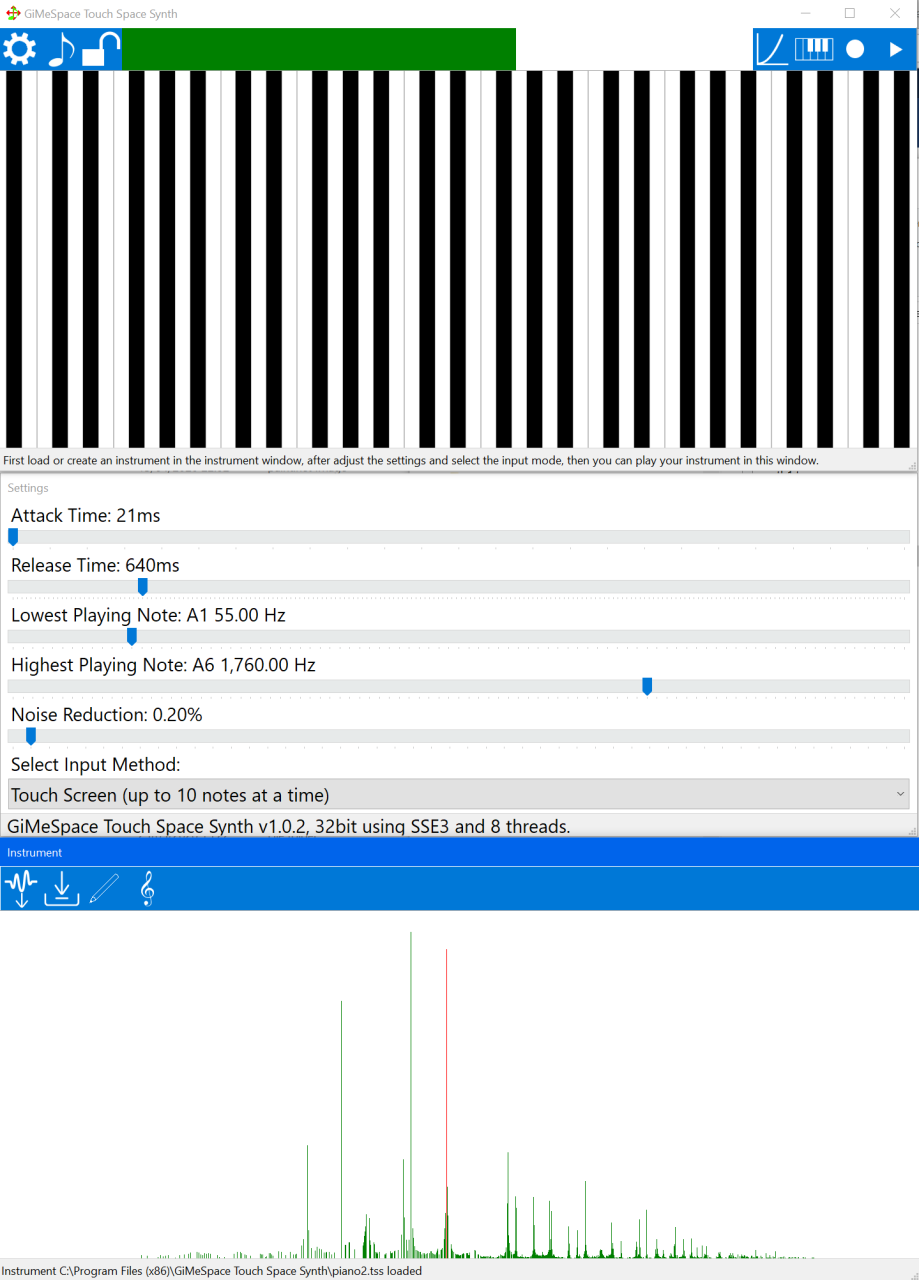
This program was created to make playing music on a computer more intuitive and affordable for anyone who wants to make music.
It offers the most natural way to make music by simply using your touch screen or your hand in front of the web cam. If you dont have these you can also use your mouse.
Creating your favourite instrument is also very easy: you need a couple of seconds of the sound that your instrument will make and import it as a WAV file. It will be converted to an instrument and you can still adjust the individual frequencies of your instrument.
In the settings window you can adjust the attack time of your instrument, short attack time means the volume and frequency of you instrument is reproduced almost instantly like with a piano or a triangle. Longer attack times sound more like a flute or violin.
The release time defines how long it takes for the sound of a note to fade away.
Also in the settings window you can select the lowest and the highest playing notes for the main playing window.
There are 2 playing modes: fluent frequencies (like with a violin) or standard notes like with a piano. Low notes are on the left and high on the right. The upper part corresponds to higher volume and below to lower volume.
When you are happy with your playing skills you can decide to record your music by clicking on the record button which will save it to a WAV file.
You can enjoy this program 30 days for free, after that you will need to register for only 14.95 usd.
System requirements: dual core processor with SSE3 (any computer produced after 2004), Windows 7 or later. Touch screen or webcam are recommended.
About GiMeSpace TouchSpace Synth
This Music Composers program is available in English. It was last updated on 29 September, 2026. GiMeSpace TouchSpace Synth is compatible with the following operating systems: Windows.
The company that develops GiMeSpace TouchSpace Synth is GiMeSpace. The latest version released by its developer is 1.2.0.
The download we have available for GiMeSpace TouchSpace Synth has a file size of 2.1 MB. Just click the green Download button above to start the downloading process. The program is listed on our website since 2022-03-01 and was downloaded 0 times. We have already checked if the download link is safe, however for your own protection we recommend that you scan the downloaded software with your antivirus. Your antivirus may detect the GiMeSpace TouchSpace Synth as malware if the download link is broken.
How to install GiMeSpace TouchSpace Synth on your Windows device:
- Click on the Download button on our website. This will start the download from the website of the developer.
- Once the GiMeSpace TouchSpace Synth is downloaded click on it to start the setup process (assuming you are on a desktop computer).
- When the installation is finished you should be able to see and run the program.
Program Details
System requirements
Download information
Pricing
Version History
version 1.2.0
posted on 2022-03-01
Better detection mechanism for your hand movements in front of your webcam.
version 1.1.0
posted on 2021-12-01
New released program: The most intuitive way to make music on a computer.
Disclaimer
External Download
We do not host GiMeSpace TouchSpace Synth on our servers. We did not scan it for viruses, adware, spyware or other type of malware. This app is hosted by the software publisher and passed their terms and conditions to be listed there. We recommend caution when installing it.
The external download link for GiMeSpace TouchSpace Synth is provided to you by apps112.com without any warranties, representations or guarantees of any kind, so access it at your own risk.
If you have questions regarding this particular app contact the publisher directly. For questions about the functionalities of apps112.com contact us.
